Vocab Loco lets you require students to complete their practice activities before they can start a Spelling Test or Vocabulary Test. This setting is configured per assignment — it does not affect other lists or existing assignments.
How to enable the practice gate
The practice gate is configured in Step 3: Activities of the word list assignment form. You can set it when creating a new assignment or by editing an existing one.
- Go to Word Lists and open the Assigned Lists tab.
- On the list card, click Settings and select Edit Assignment. In the What do you want to edit? modal, choose Activities (step 3).
- Inside the Vocabulary Test card, you will find the toggle: Require ENABLED vocabulary practice before Vocabulary Test. Turn it ON to activate the gate for that test.
- Inside the Spelling Test card, find the same toggle for spelling: Require ENABLED spelling practice before Spelling Test. Turn it ON independently if needed.
- Save the assignment.
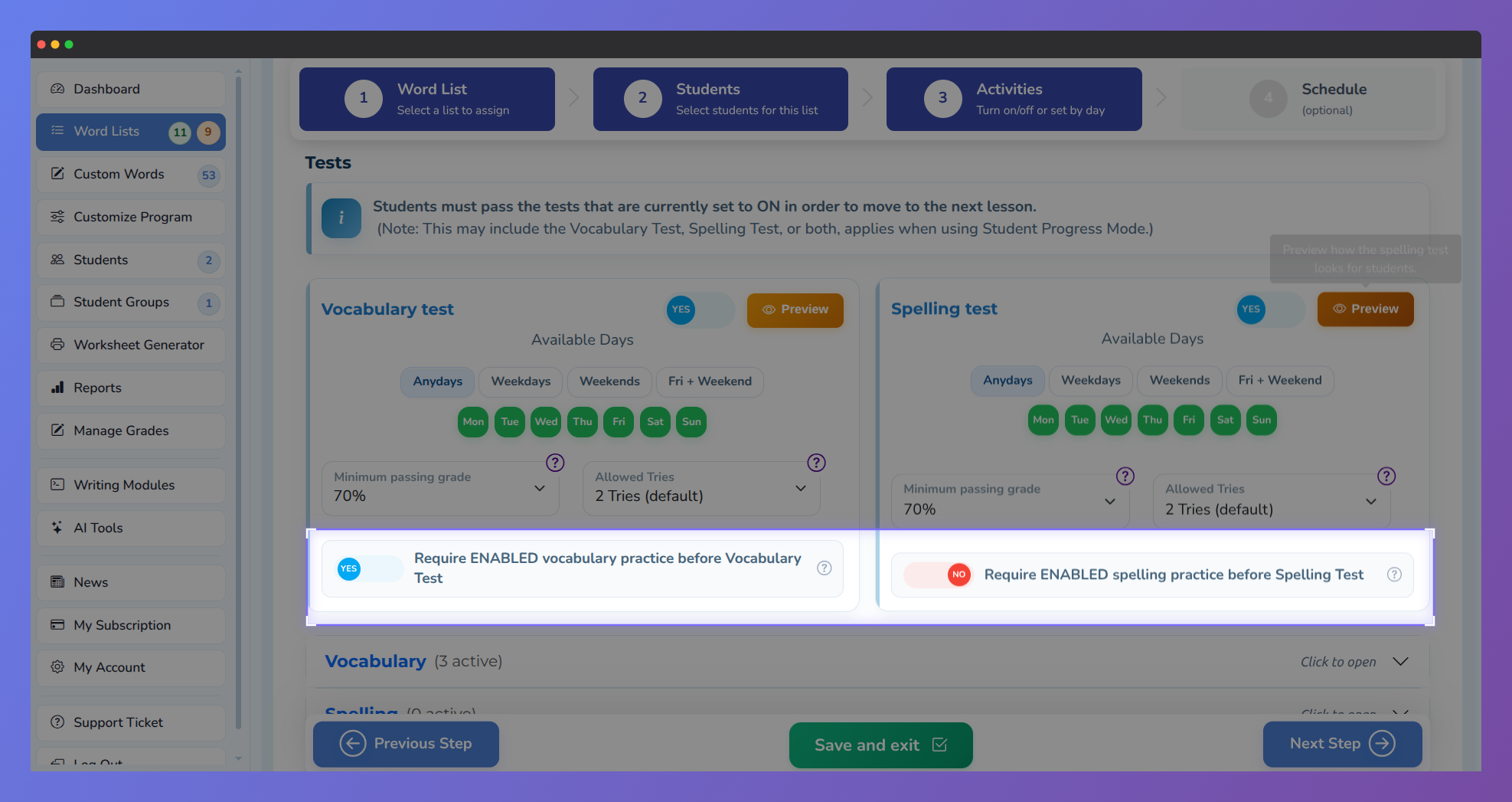
Screenshot of Step 3 (Activities) in the word list assignment form, showing the Tests section.
The two gates are independent. You can require practice for the Vocabulary Test only, the Spelling Test only, or both at the same time.
What students see
When a student opens a test that is gated and they have not yet completed the required practices, they will see a locked screen instead of the test. The screen shows:
- A Pass practice activities first message.
- A list of the specific activities they still need to complete.
- A Go to Practice Activities button that takes them directly to their practice list.
Once all required practices are passed, the test unlocks automatically and the student can proceed.
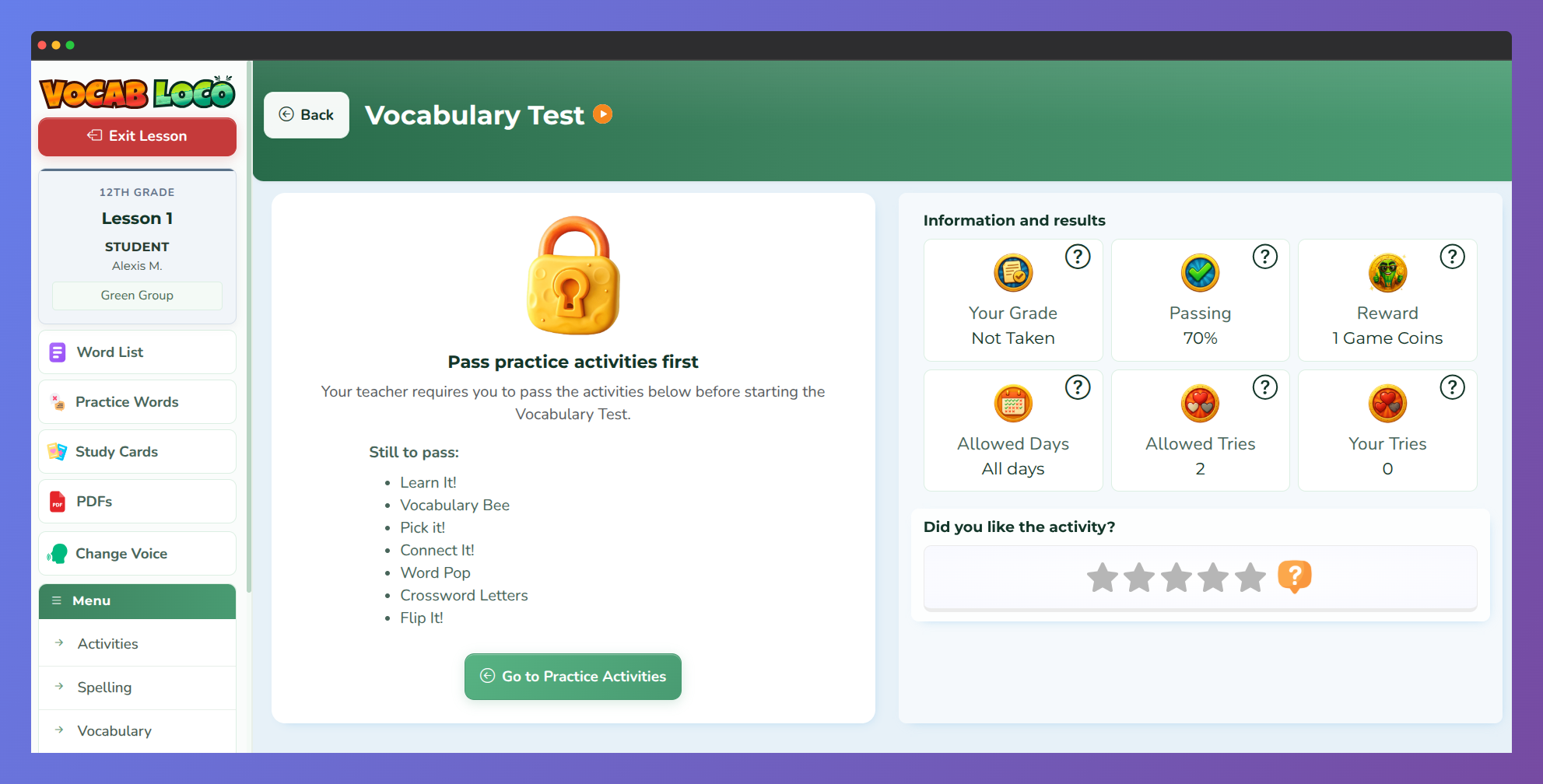
Screenshot of the Vocabulary Test page from a student's perspective when the practice gate is active.
What counts as a required practice
Only practice activities that are enabled (ON) in the assignment count toward the gate. Specifically:
- For the Vocabulary Test gate: all enabled vocabulary practice activities in the assignment.
- For the Spelling Test gate: all enabled spelling practice activities in the assignment.
The following are never included in the gate requirement:
- The tests themselves.
- Review activities for banked or wrong words.
- Typing, Writing, Poem, Story Time, and Vocab Beats activities.
Q: What happens if the gate is ON but all practices of that type are turned OFF?
A: The test opens normally. The gate only applies when at least one practice activity of that type is enabled.
How to unlock a student
If a student is stuck and cannot access a test, you have three options without waiting for them to finish the activities:
- Turn off the gate toggle in the assignment settings. The test will unlock immediately for all students.
- Turn off the specific practice activities the student has not yet completed. Only the activities left ON count toward the requirement.
- Have the student complete the pending activities normally — the test unlocks as soon as all required practices are passed.
Q: If a student already passed the test before the gate was turned ON, will they be locked out on retake?
A: Yes. If the gate is enabled after a student has already taken the test, they will need to complete the required practices before retaking it.
Was this article helpful?
That’s Great!
Thank you for your feedback
Sorry! We couldn't be helpful
Thank you for your feedback
Feedback sent
We appreciate your effort and will try to fix the article