The Customize Program section lets you configure program-wide settings for your students. It is divided into six tabs: Settings, IP Block, Vocab Beats, AI Configuration, Games, and Game Coins.
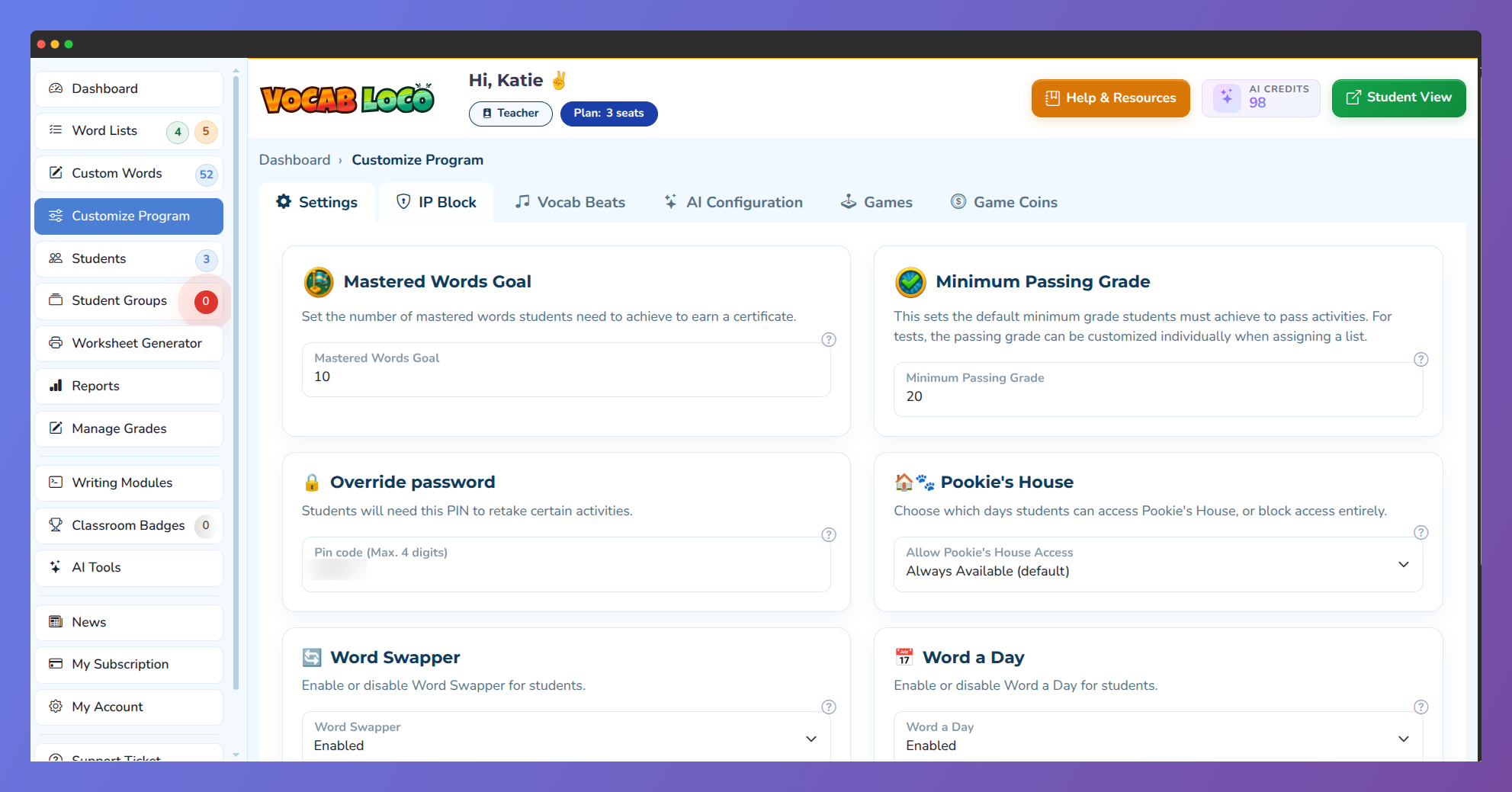
Screenshot showing the Settings section of the Vocab Loco Customize Program page.
Settings Tab
Mastered Words Goal
Set the number of Mastered Words students must reach to earn a certificate. For example, setting the goal to 10 means students receive a certificate when they achieve 10 Mastered Words.
Minimum Passing Grade
Define the minimum required grade for students to pass activities on Vocab Loco. For tests, the passing grade can be customized individually when assigning a list.
Override Password
Use the Override Password to grant extra attempts to students in certain modules. For example, if you limit attempts for Vocabulary Tests or Spelling Tests and students run out of tries, you can provide additional attempts by entering this password.
Pookie's House Availability
Choose when students can access Pookie's House. You can schedule availability on specific days or set it to Always Available by default.
Word Swapper
Enable or disable the Word Swapper module for your students.
Word a Day
Enable or disable the Word a Day widget on the student dashboard. When enabled, students see a new vocabulary word each day with its definition and synonyms.
Student Play Time in Pookie's House
Set the maximum daily playtime (in minutes) for students to interact with their virtual pet, Pookie.
IP Block Tab
The IP Block tab lets you restrict student access to Vocab Loco based on your school's IP address. This ensures students take tests such as Vocabulary Tests or Spelling Tests only from within the school network.
- To enable this feature, activate the In-School Only Setting.
- Add your school's IP address or IP address range. Students attempting to access tests outside the allowed IP addresses will be denied access.
Vocab Beats Tab
In the Vocab Beats tab, you can customize the difficulty levels of the Vocab Beats module based on student grade levels. Drag and drop grades between the following columns to rearrange difficulty:
- Level 1 – Easy: Students simply listen to each word. All target words are automatically displayed as the audio plays. The module completes once all words have been heard.
- Level 2 – Intermediate: Students see approximately 70% of each word. This partial visibility helps students identify and type the full word.
- Level 3 – Advanced: Only the first letter of the word is displayed, challenging students to listen closely, think critically, and correctly type each hidden word.
AI Configuration Tab
The AI Configuration tab gives you quick access to your AI tools and usage. From here you can navigate directly to the AI Tools page to manage your AI credits and view your usage history.
Games Tab
The Games tab lets you control student access to the Games Page, which features a library of arcade and casual games available as a reward.
- Games Available Days: Choose which days students can access the Games Page, or set it to Game Page Off to disable it entirely.
- Daily Game Limit: Set the maximum number of games a student can play per day. Options range from Unlimited to 30 games.
- Individual game toggles: Each game is displayed as a card. Use the Enable switch on each card to show or hide that game from students.
Game Coins Tab
The Game Coins tab lets you manage the coin balance for each student. You can add or remove coins individually or apply a bulk change to all students at once. Students use coins within the Games Page.
Was this article helpful?
That’s Great!
Thank you for your feedback
Sorry! We couldn't be helpful
Thank you for your feedback
Feedback sent
We appreciate your effort and will try to fix the article