Word Swapper isn't just a fun vocabulary tool — it's a science-informed, student-powered approach to lifelong word mastery. Instead of memorizing lists of disconnected words, students zoom in on one word at a time, use it across multiple modalities, and build lasting, context-based confidence.

Step 1: Student ownership begins the journey
Students choose a category and are shown a word pair — a boring word they likely use often, paired with a more powerful synonym. They can shuffle pairs until one feels right, then click Commit to this Swap! to lock in their choice. This personalization increases motivation and makes learning relevant and memorable.
Step 2: Word Swap Card — visual interchangeability
Students are shown their chosen boring word and its Power Word side-by-side with definitions and examples. A toggle switch — Flip the switch — live-swaps the word in a sentence, demonstrating how the new word can be used immediately in their world. Students must flip the switch before moving on.
Step 3: Hear it. Say it. Write it.
Word Swapper engages multiple learning channels — auditory, verbal, and kinesthetic:
- Students hear correct pronunciation.
- They say it aloud to build fluency.
- They write it by hand (print or cursive) to deepen retention through kinesthetic reinforcement.
Step 4: Sentence Builder — put it into words
Students write one sentence using their Power Word. The system checks that the sentence includes the word, starts with a capital letter, ends with punctuation, and is at least three words long — ensuring the word is actively used in context, not just recognized.
Step 5: Poem Power — tone, nuance, and fun
A short, clever rhyming poem compares the boring word with the Power Word, with both words highlighted throughout. Students can tap Read to Me to hear it read aloud. A progress circle fills as they read — the Next step button only appears once they've taken it all in. It's a joyful way to build comprehension and word sensitivity.
Step 6: 3-Day Power Word Mission
Students take on a mission to use their Power Word in real conversations. Each day, they write one sentence using the word — the system checks it's valid before saving. After each completed mission, the next one unlocks automatically. One mission per day keeps the practice spaced and meaningful.
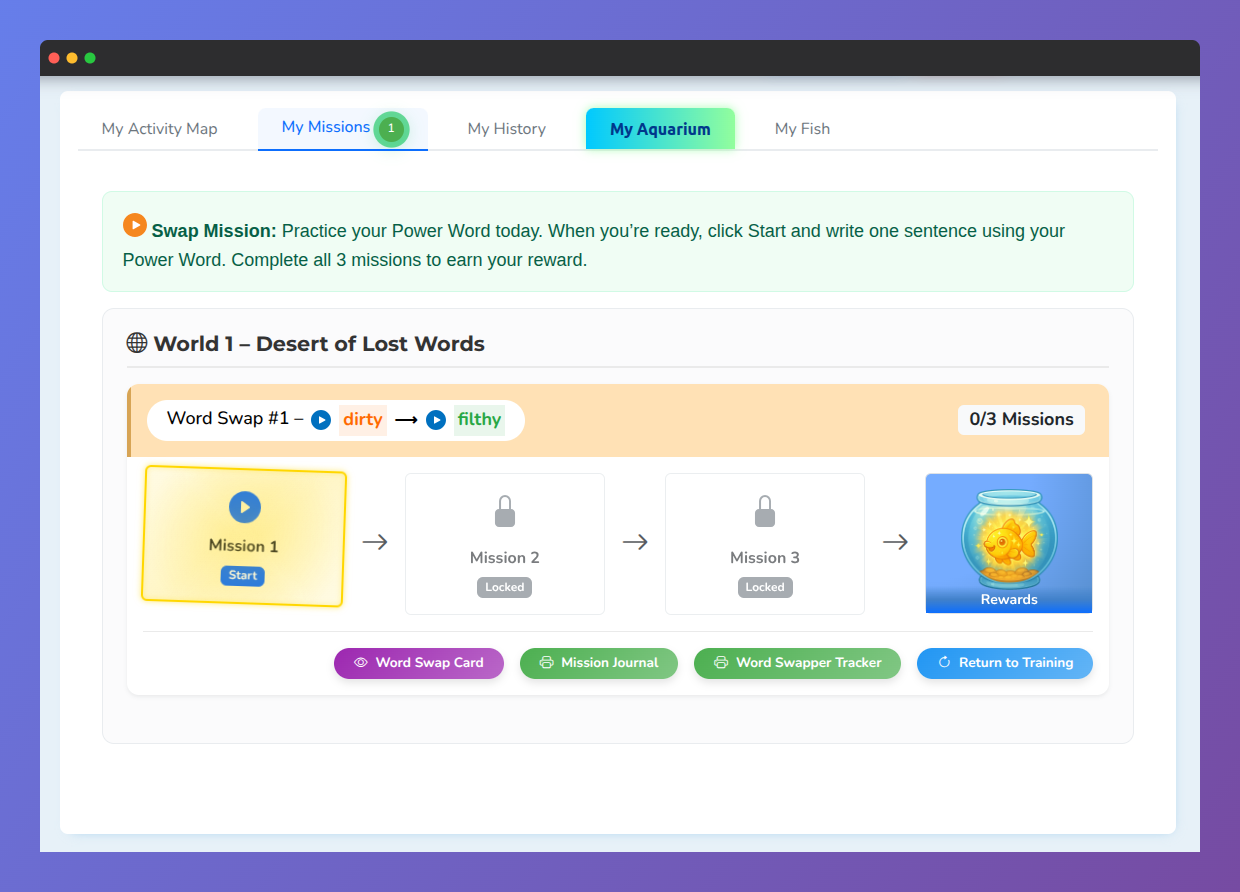
The Fish is the Reward — and a Long-Term Reminder
Once all three missions are completed, students earn a fish named after their Power Word. That fish lives in their digital aquarium and acts as a daily visual and emotional cue — keeping the word fresh in memory long after training ends.
Why it works: the science behind Word Swapper
Traditional vocabulary study asks students to memorize disconnected words in bulk, often for short-term recall on a quiz. Word Swapper applies proven learning science instead:
- Dimmer-Switch Learning — Vocabulary is not all-or-nothing. Students gradually grow more comfortable using a word through multi-context, spaced exposure to one word at a time.
- Semantic Chunking — The new Power Word is connected to a familiar boring word, grounding learning in a known concept and building mental pathways for easier recall.
- Contextualized and Emotional Learning — Students don't just see the word — they use it in writing, build it into poems, and associate it with personal success (a named fish). That's deep encoding.
- Student Voice, Choice, and Joy — Gamified modules, creative writing, personalized rewards, and interactive design transform learning from a task into a mission students want to complete.
Word Swapper has been added to the student dashboard as a bonus feature — ready to explore like Word of the Day, but with even more power behind it.
Was this article helpful?
That’s Great!
Thank you for your feedback
Sorry! We couldn't be helpful
Thank you for your feedback
Feedback sent
We appreciate your effort and will try to fix the article