
Vocab Loco’s Word List Insights with AI helps teachers turn word list activity data into clear, actionable insights—without spreadsheets or manual analysis.
With just a few clicks, you can analyze student performance, identify learning gaps, and generate targeted recommendations to support instruction and intervention.
What Are Word List Insights with AI?
Word List Insights uses AI to analyze how students interact with a specific word list and surfaces patterns related to:
Student progress and mastery
Word retention and difficulty trends
Class-wide and individual performance gaps
Suggested instructional and intervention focus areas
AI insights are generated only when a teacher chooses to run an analysis.
When Are AI Credits Used?
AI credits are only used when an analysis is generated.
Setting up a word list or viewing options does not use credits
You will always see the credit cost before running an analysis
AI analysis is optional and fully teacher-controlled
How to Analyze a Word List with AI
Open the assigned word list you want to analyze
Select Analyze with AI
Choose how you want to run the analysis:
Entire Class Analysis – analyzes all students assigned to the list
Specific Students – analyze selected students only
Select the type of AI report you want to generate
Confirm and run the analysis
Once generated, your report will appear with detailed insights and recommendations.
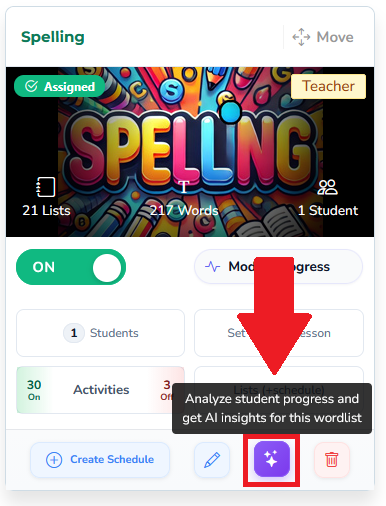
Available AI Report Types
Depending on your selection, AI insights may include:
Class Snapshot
A high-level overview of performance, engagement, and progressIntervention Overview
Identifies students who need immediate support based on performance dataWord Retention Alerts
Highlights words students previously mastered but may be forgetting
Additional report types may be available as AI features expand.
How Teachers Use These Insights
Teachers commonly use Word List Insights to:
Identify struggling students early
Adjust instruction based on real performance data
Plan targeted interventions
Monitor retention over time
Share clear, parent-friendly summaries when needed
All insights are generated directly from your existing word list activity—no extra setup required.
Important Notes
AI insights are recommendations, not grades
Teachers remain in full control of how insights are used
No student data is shared outside your account
AI tools are optional and can be used as needed
Related Tutorials
Generate Word Lists with AI
Analyze Word List Performance with AI
AI Credits and Usage Overview
Was this article helpful?
That’s Great!
Thank you for your feedback
Sorry! We couldn't be helpful
Thank you for your feedback
Feedback sent
We appreciate your effort and will try to fix the article