The Usage History page shows how AI credits are being used across your classroom. Teachers can view high-level summaries, filter activity, and open detailed records for each AI event.
This helps you monitor usage, understand where credits are going, and review AI-generated results.
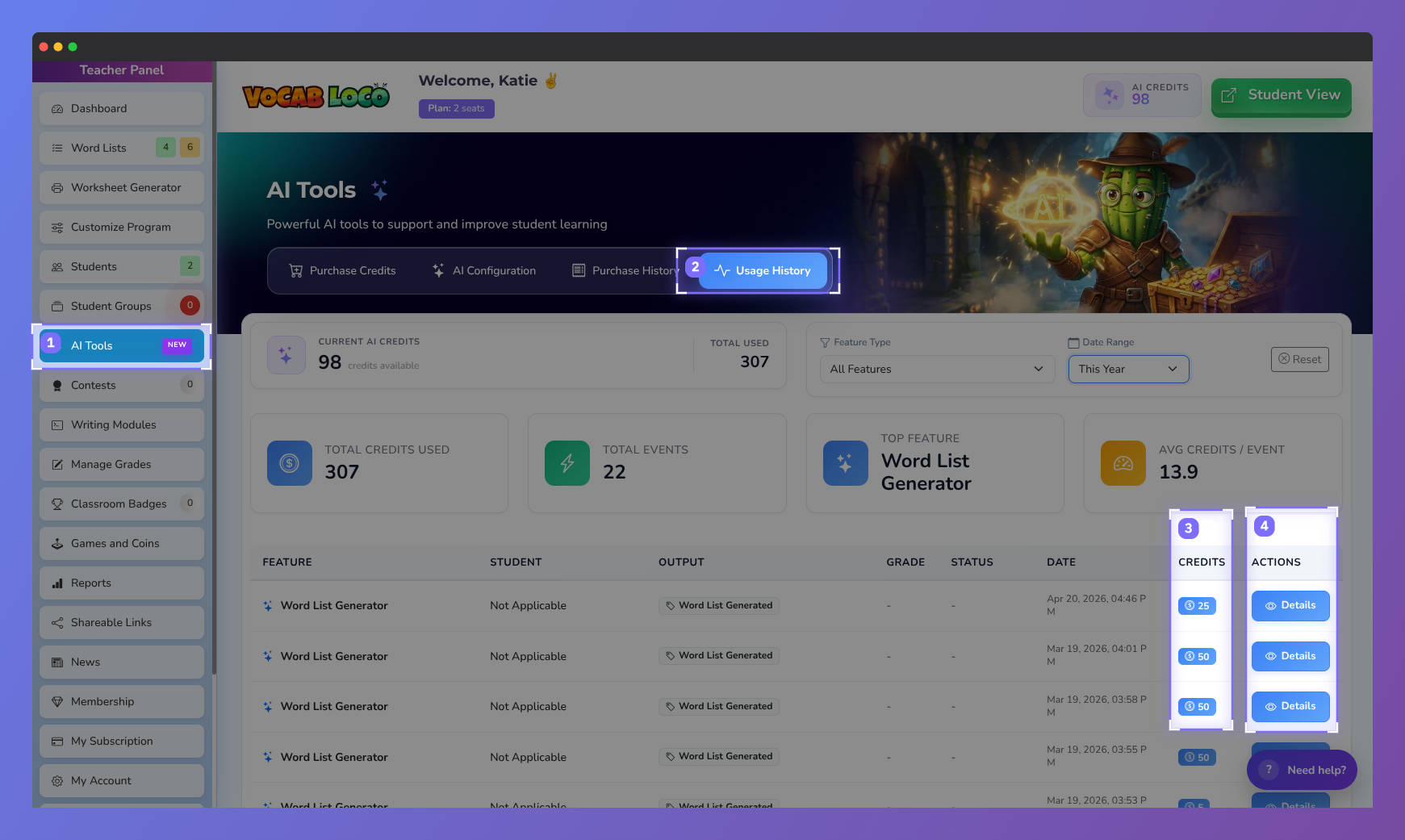
Screenshot of the Vocab Loco AI Tools Usage History page showing AI credit usage analytics, feature activity tracking, generated events, and detailed logs for monitoring AI-powered classroom tools.
How to Access Usage History
- From the Teacher Panel, click AI Tools
- Select Usage History at the top of the page
This opens the AI usage dashboard.
Usage History Summary Overview
At the top of the page, you’ll see a summary of AI activity, including:
- Current AI Credits – credits remaining in your account
- Total Credits Used – total credits consumed during the selected time period
- Total Events – number of AI actions that ran
- Top Feature – the AI tool using the most credits
- Average Credits per Event – typical credit usage per AI action
These summary cards update automatically based on your selected filters.
Filtering Usage History
You can filter usage data to focus on specific activity:
- Feature Type – view usage for a specific AI tool or all features
- Date Range – filter by time period (for example, This Week)
Filters help you quickly understand patterns and high-usage areas.
Viewing the Usage Table
Below the summary cards is a detailed table showing each AI event. Each row includes:
- Feature – the AI tool that ran
- Student – the student associated with the event (if applicable)
- Output – the type of result generated
- Grade – score (for grading-related events)
- Status – approved, redo, or not applicable
- Date – when the AI action occurred
- Credits – number of AI credits used
- Actions – access to detailed results
This table provides a complete audit trail of AI usage.
Viewing AI Prediction Details
To see full details for any AI event:
- Click Details in the Actions column
- A panel opens showing the AI Prediction Details
Depending on the feature, details may include:
- Student name and username
- Grade and approval status
- Module and word list used
- Vocabulary words involved
- Student writing or generated content
- AI-generated results
This allows teachers to fully review what the AI evaluated or created.
Why Usage History Is Helpful
- Track how AI credits are being used
- Identify which AI features are used most often
- Review individual grading or generation events
- Support transparency for classrooms and administrators
- Make informed decisions about future credit purchases
Key Takeaway
Summary: Usage History gives teachers full visibility into AI activity, from high-level credit summaries to detailed, per-event results.
Related Articles
Was this article helpful?
That’s Great!
Thank you for your feedback
Sorry! We couldn't be helpful
Thank you for your feedback
Feedback sent
We appreciate your effort and will try to fix the article